
How to Set Up Plasmo Voice Without a Public IP
Plasmo Voice adds proximity voice chat to Minecraft: you hear whoever is near you. The catch is that voice does not travel over the game port — it is a separate UDP stream, and clients have to be told which public address to reach it on. Here is how to set up Plasmo Voice through a tunnel, with no public IP and no port forwarding.
Why one tunnel is not enough
Your server has two independent channels:
| Channel | Protocol | Local port |
|---|---|---|
| The game | TCP | 25565 |
| Plasmo Voice audio | UDP | its own, e.g. 25566 |
Game and voice are different protocols, so you need two tunnels. The plugin ships with port = 0, meaning "the same port as the Minecraft server". That will not do here: a tunnel forwards one specific port on one specific protocol, so voice needs a port of its own.
The second piece: the plugin has to hand clients the public address of the voice server. It cannot work that out by itself — from the outside that address belongs to the tunnel, not to your machine. The [host.public] block exists for exactly this.
What you need
- A server on a plugin-capable core — Paper, Purpur or Spigot.
- The Plasmo Voice plugin on the server.
- The Plasmo Voice mod on every player's client. Without the client mod there is no voice — this is not a server-side feature that switches itself on.
- ProximaClient and a ProximaMP account.
Step 1. The server and a tunnel for the game
No server yet? Create one in ProximaClient on the Paper or Purpur core and switch on "Create a public tunnel for the server" right away — a TCP tunnel on 25565 comes up automatically. Walkthrough: how to create a game server.
Already have a server without a tunnel? Create the TCP tunnel on 25565 by hand: how to open a TCP port with a tunnel.
Step 2. Install the Plasmo Voice plugin
Download the build for your core from Plasmo Voice on Modrinth and drop the .jar into the server's plugins/ folder. More on installing: how to install plugins.
Step 3. Restart the server
This step is not optional: the plugin generates its config files on first launch. Until you restart, plugins/PlasmoVoice/ does not exist and there is nothing to edit.
Once the server is up, you will find config.toml inside it.
Step 4. Open a UDP tunnel for voice
Go to the Tunnels screen (first icon in the left sidebar) and click +:
- Name — "PlasmoVoice", for instance.
- Protocol — UDP. Voice only travels over UDP; TCP will not work.
- Local port — 25566. Any free port will do, just not 25565 — the game is there.
- Location — Auto.
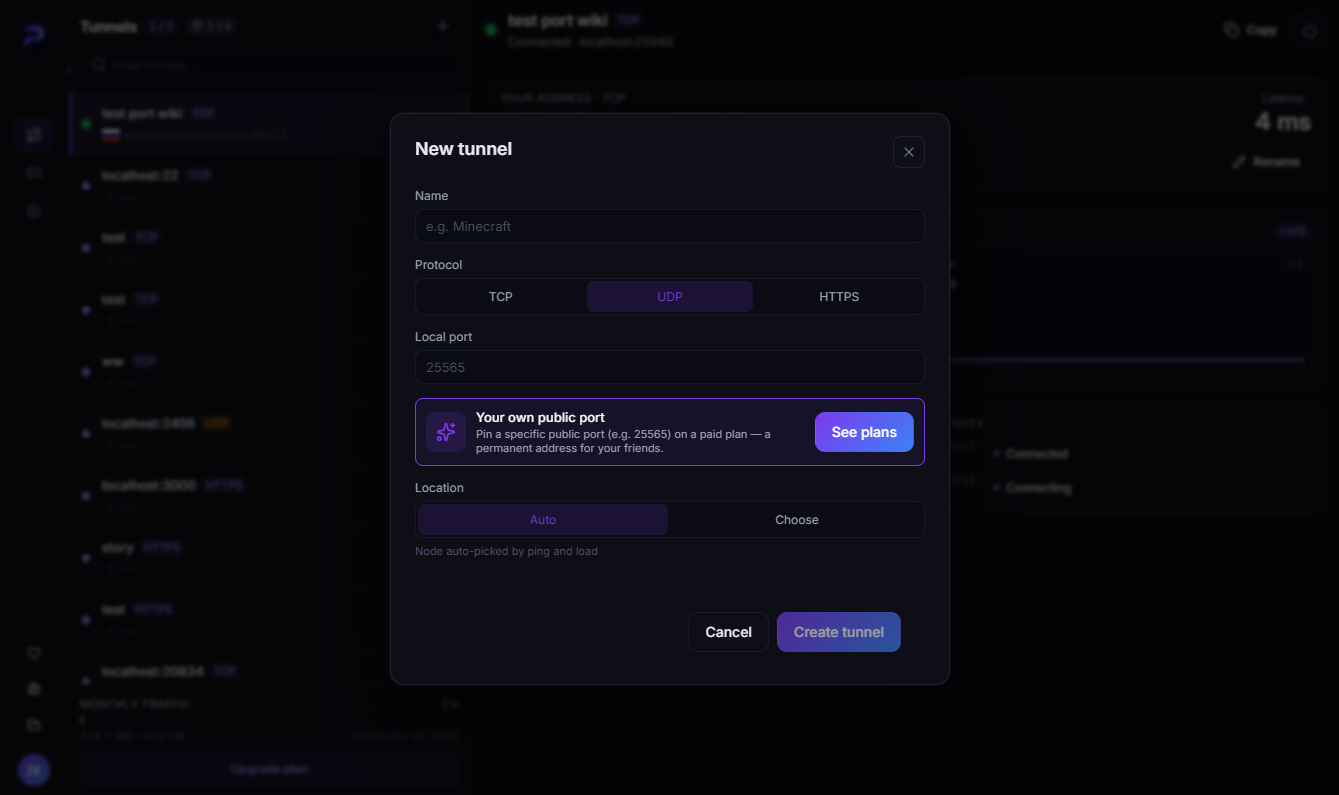
Click Create tunnel, then look at the Your address · UDP block on the tunnel card — something like archi.proximamp.com:30335. Write down both parts, host and port — they go into the config next.
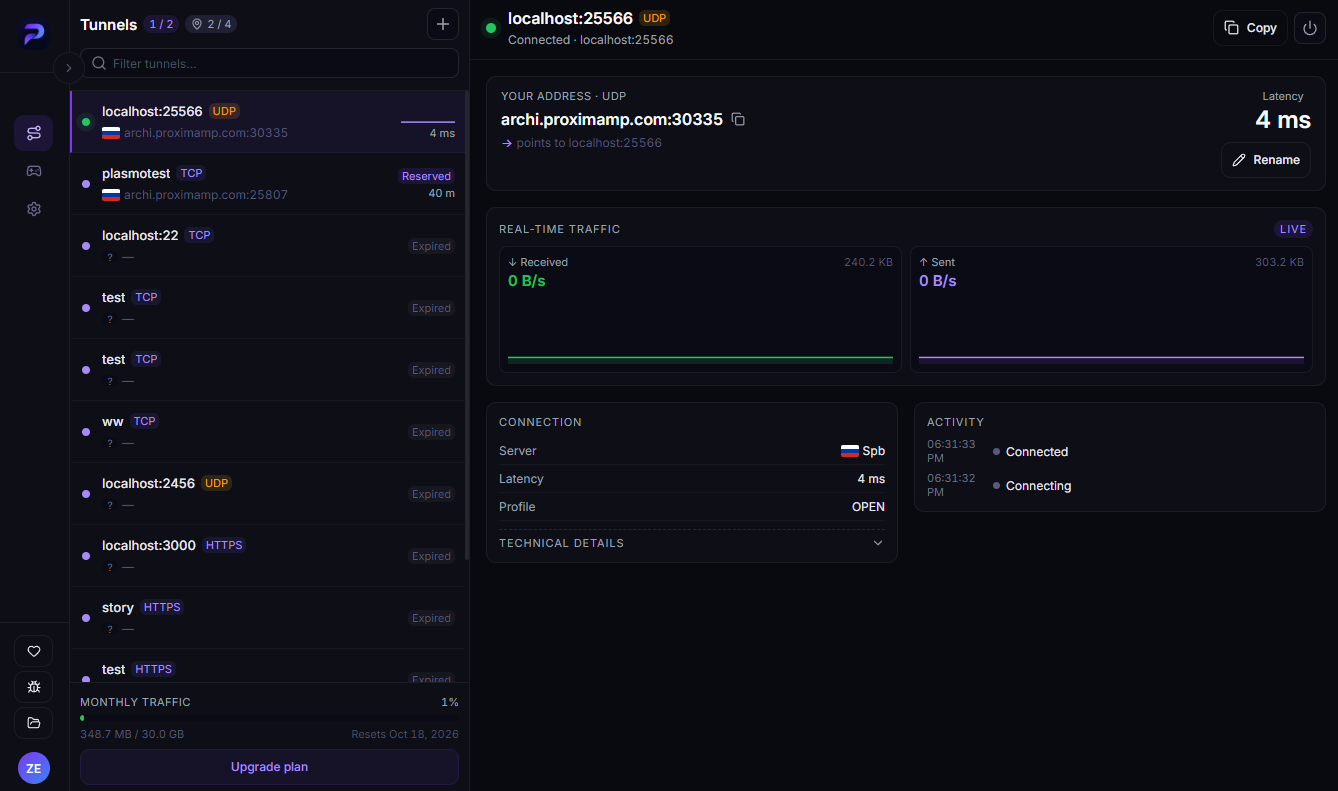
Both tunnels are visible in the screenshot: the game tunnel plasmotest on TCP and the voice one on UDP. The game tunnel shows Reserved here because the server is stopped, so the address is still being held for its owner.
Step 5. Set the port in the [host] block
Open plugins/PlasmoVoice/config.toml. You can edit it right inside ProximaClient — the server page has a Files tab with the folder tree and a built-in editor with a Save button.
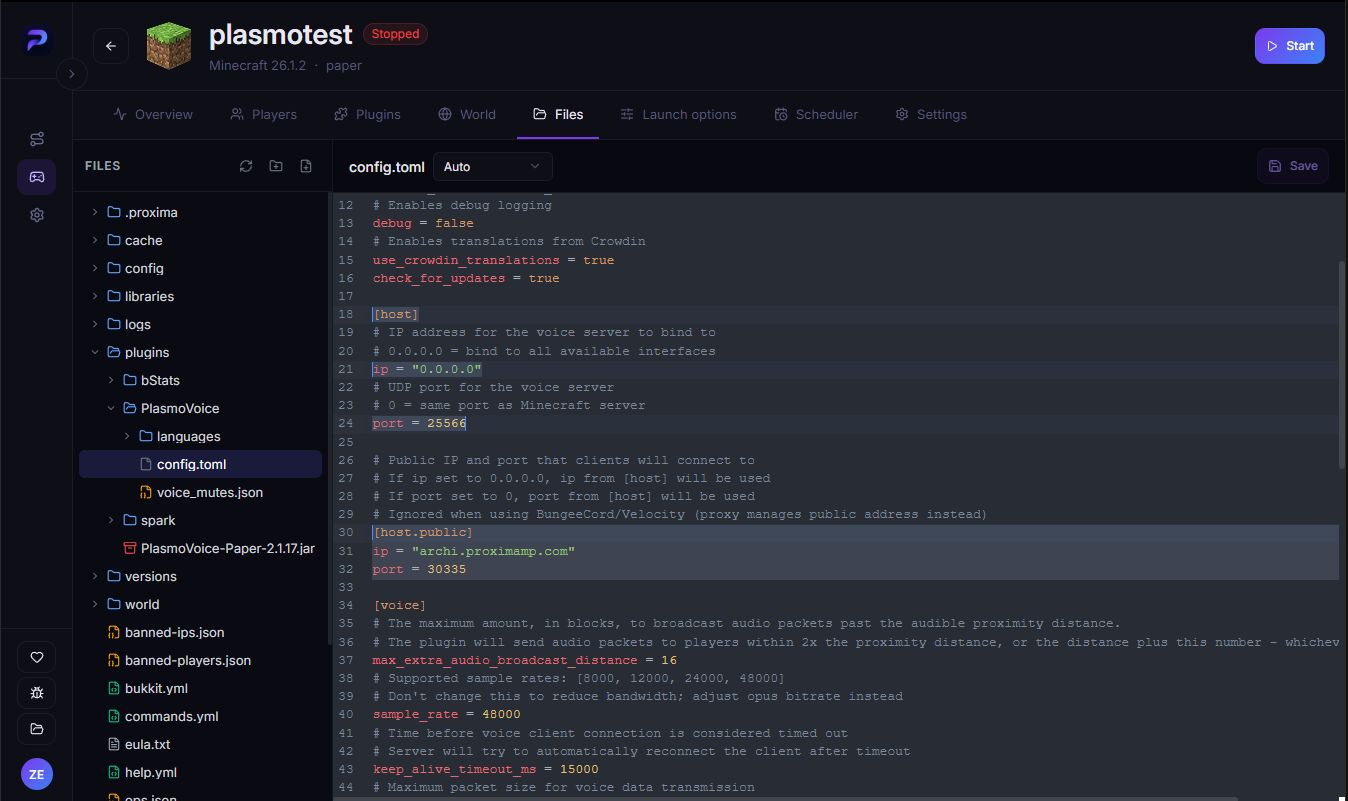
Find the [host] block and set the local port — the one you just tunnelled:
[host]
# IP address for the voice server to bind to
# 0.0.0.0 = bind to all available interfaces
ip = "0.0.0.0"
# UDP port for the voice server
# 0 = same port as Minecraft server
port = 25566
Leave ip = "0.0.0.0" alone — that is the address the voice server listens on inside your machine.
Step 6. Uncomment [host.public]
Below it sits the [host.public] block, commented out by default. Strip the # from its lines and fill in the tunnel address from step 4:
[host.public]
ip = "archi.proximamp.com"
port = 30335
The difference between the two blocks is the thing people get wrong most often:
| Block | What it means | Where the value comes from |
|---|---|---|
[host] | where the voice server listens locally | the port you tunnelled (25566) |
[host.public] | where players connect | the address on the tunnel card (archi.proximamp.com:30335) |
The numbers will not match, and that is correct: a tunnel's external port is assigned automatically and is almost never the same as the local one.
Save the file.
Step 7. Restart the server once more
The config is read at startup, so nothing applies until you restart. After that voice should work: join through the game tunnel address and try it.
If voice does not work
- A player has no client mod. By far the most common cause. Plasmo Voice is needed on both ends.
- The tunnel was created as TCP instead of UDP. Check the protocol badge in the tunnel list.
- The ports are swapped.
[host]takes the local one (25566),[host.public]the external one from the tunnel (30335). The other way round will not work. [host.public]is still commented out. Then the plugin hands clients a local address that nobody outside can reach.- The server was not restarted after editing. The config is only picked up at startup.
port = 0is still in[host]. That means "the Minecraft server's port", which a tunnel cannot serve — set an explicit port.- Port 25566 is taken by another program. Then the voice server never starts — see Failed to bind to port.
FAQ
How many tunnels does this need? Two: TCP for the game, UDP for voice. Each takes its own slot against your plan limit — the counter is in the Tunnels screen header, terms on the ProximaTunnel page.
Can I use a port other than 25566? Any free one. Just keep the same number in [host] and in the tunnel's Local port field.
Why is the port in [host.public] different? That is the tunnel's external port, assigned automatically. Local and external ports do not have to match.
The tunnel address changed — now what? Put the new one in [host.public] and restart the server. To stop it changing, pin the external port through the Your own public port block in the create dialog.
Do players need ProximaClient? No. They need the Plasmo Voice mod and the server address, nothing else.
Get voice chat running
Download ProximaClient for Windows → — the starter plan is free, and both tunnels take a couple of minutes.
Related: how to open a UDP port with a tunnel · how to install plugins · how to expose a local port to the internet