
How to Open a TCP Port Without Port Forwarding
TCP carries most of the services worth exposing at all, from a Minecraft server to SSH. Here is how to open a TCP port with a ProximaTunnel tunnel — no public IP, no port forwarding on the router, no network admin rights.
What runs on TCP
TCP guarantees that data arrives, and arrives in order. If your service moves files, commands or state that cannot be lost, it is TCP.
| Service | Typical port |
|---|---|
| Minecraft server (Java Edition) | 25565 |
| Terraria | 7777 |
| Web server or dev server without TLS | 3000, 5173, 8000, 8080 |
| SSH | 22 |
| RDP (Windows Remote Desktop) | 3389 |
| PostgreSQL / MySQL | 5432 / 3306 |
| RCON on Source and GoldSrc servers | 27015 |
If your service serves a website and needs a valid certificate, TCP is the wrong mode — use HTTPS instead, covered in its own guide. Voice chat and most shooters live on UDP, see how to open a UDP port.
First: the service has to be listening
A tunnel does not start anything — it only pipes traffic into a service that is already running. Start the service first, create the tunnel second.
To confirm the port really is taken by your service, use the Windows command line:
netstat -ano | findstr :25565
A line with LISTENING means the service is up and you can carry on. Nothing at all means it is not running, or it is listening on a different port.
Listening on
127.0.0.1is enough. ProximaClient runs on the same machine and connects locally, so there is no need to bind your service to0.0.0.0just for the tunnel.
Opening the port
Step 1. Open the Tunnels screen
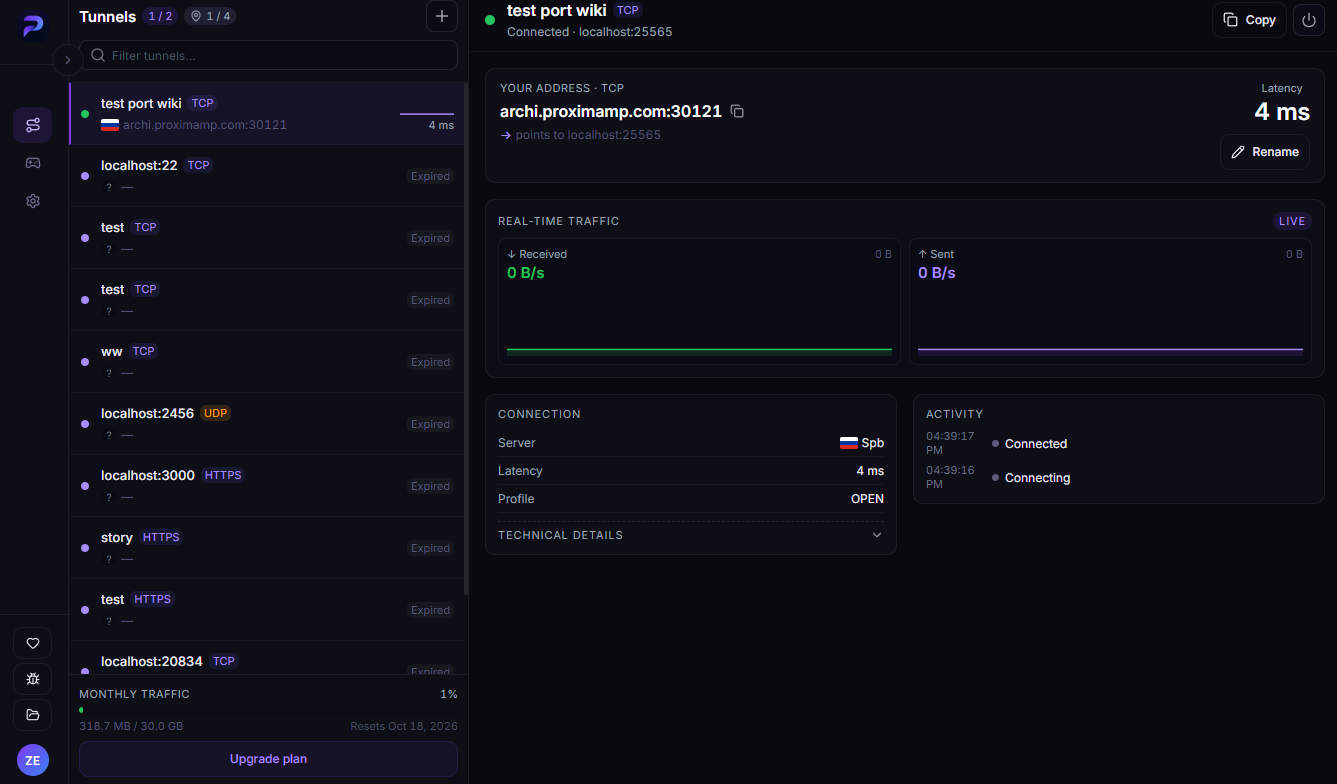
Launch ProximaClient and click the first icon in the left sidebar, then the + button next to the heading.
Step 2. Fill in the New tunnel dialog
- Name — something like "Minecraft" or "Dev server".
- Protocol — pick TCP.
- Local port — the port you just checked with
netstat. - Location — Auto if people will connect from all over, or Choose and the node with the lowest ping if you know the region.
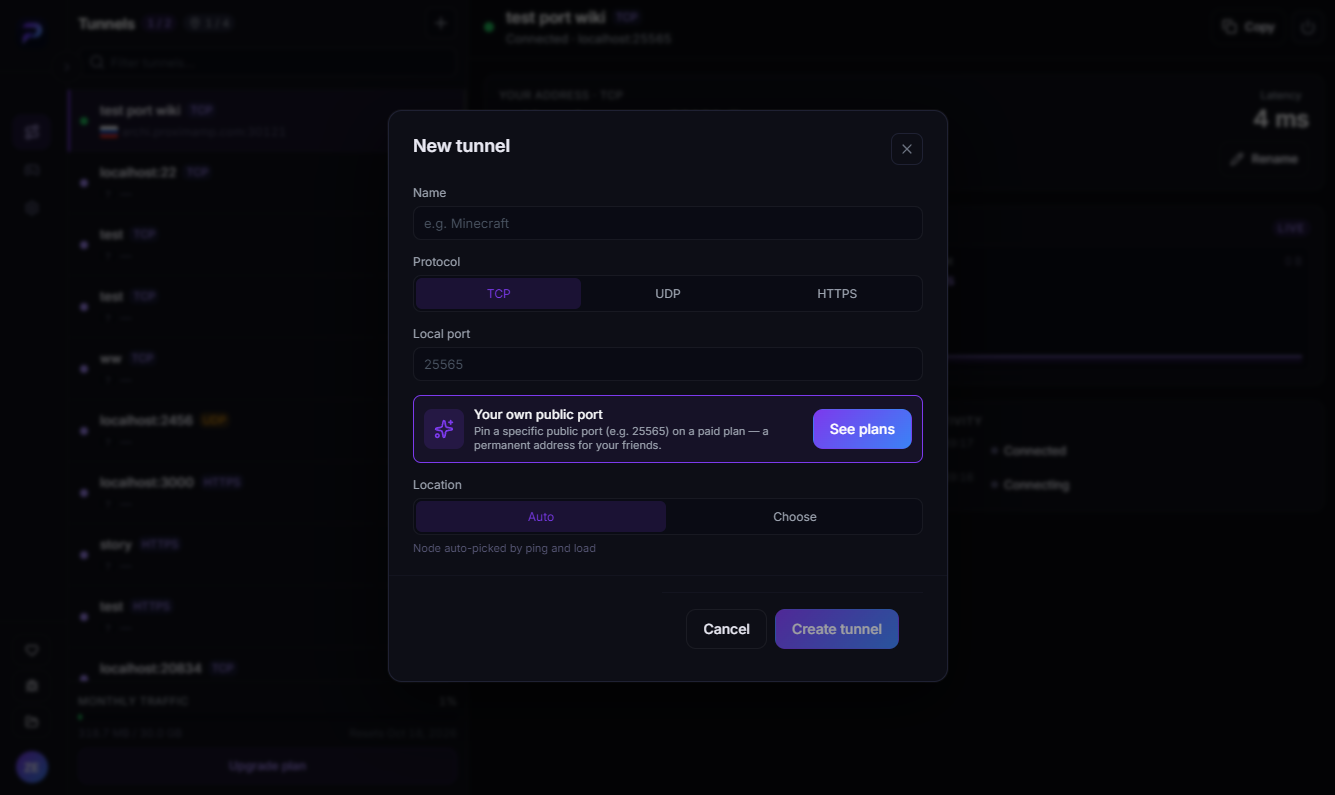
Click Create tunnel.
Step 3. Copy the address
The tunnel card shows a Your address · TCP block with an address like archi.proximamp.com:30121 and a line telling you which local port it feeds. Copy puts it on the clipboard.
That is the full address including the port, and that is exactly how it gets pasted:
- in Minecraft — into the Server Address field when adding a server;
- in a browser — as
http://archi.proximamp.com:30121; - in SSH —
ssh user@archi.proximamp.com -p 30121, with the port as a separate-pflag.
The external port will not match the local one
That is normal and almost always the case: the tunnel is published on its own automatically assigned port. Local 25565 may face the world as 30121.
For Minecraft that means your friends have to type the address with the port — the hostname alone will not connect. If you want the familiar 25565 on the outside, the New tunnel dialog has a Your own public port block: on a paid plan the external port is pinned to you and stops changing. Plan details are on the ProximaTunnel page.
When it will not connect
- The service is not running. The tunnel will say Connected while connections drop. Check
netstat. - Wrong protocol. The game or service speaks UDP but the tunnel is TCP, so nothing gets through. Check the table above.
- Address without the port. The port is part of the address — copy the whole string.
- The service listens on a different port. The server config may have changed it; the tunnel must use the same number.
- The port is taken by another program. Then the service simply will not start — see Failed to bind to port.
FAQ
Do I need a public IP? No. The tunnel opens an outbound connection and ProximaMP supplies the external address.
How many TCP tunnels can I run? It depends on your plan; the counter sits in the Tunnels screen header. Numbers are on the ProximaTunnel page.
Do the people connecting need ProximaClient? No, the client is only needed on the machine running the service.
Can I open several ports at once? Yes — one tunnel per port.
What if the service runs on another computer on my network? The tunnel points at a local port on the machine running ProximaClient, so install the client on the same machine as the service.
Open your TCP port
Download ProximaClient for Windows → — free starter plan, and a tunnel takes a couple of minutes.
Related: how to expose a local port to the internet · a Minecraft server without port forwarding