
How to create a Minecraft server in ProximaClient
ProximaClient is the free, single launcher for ProximaMP products. A Minecraft server is created in it in one window: you pick a core or a ready-made template, a version and memory, and the app downloads the core and the right Java for you. No command line, no configs, no start.bat. Let's go through, step by step, how to create a Minecraft server in ProximaClient.
Before you start
- Download and install ProximaClient for Windows: download →.
- To open the server to friends through a public tunnel, you'll need a ProximaMP account.
Creating a server step by step
The Create game server window has three steps — Game, Build and Setup. The indicator at the bottom of the window shows which step you're on. Other games follow the same flow (only Sven Co-op has two steps) — the general walkthrough is in How to create a game server in ProximaClient.
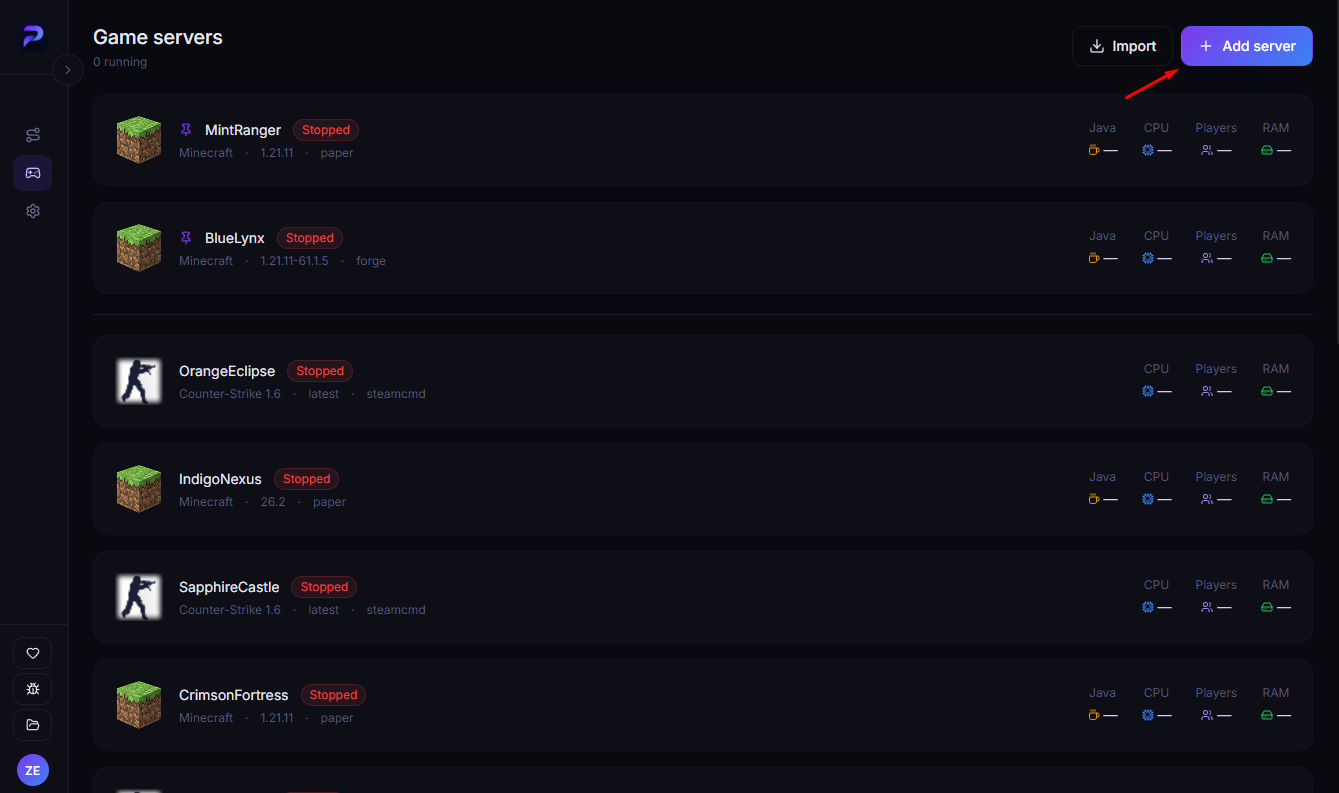
Open ProximaClient, go to the Game servers screen — the gamepad icon in the left menu — and click Add server.
Step 1. Game
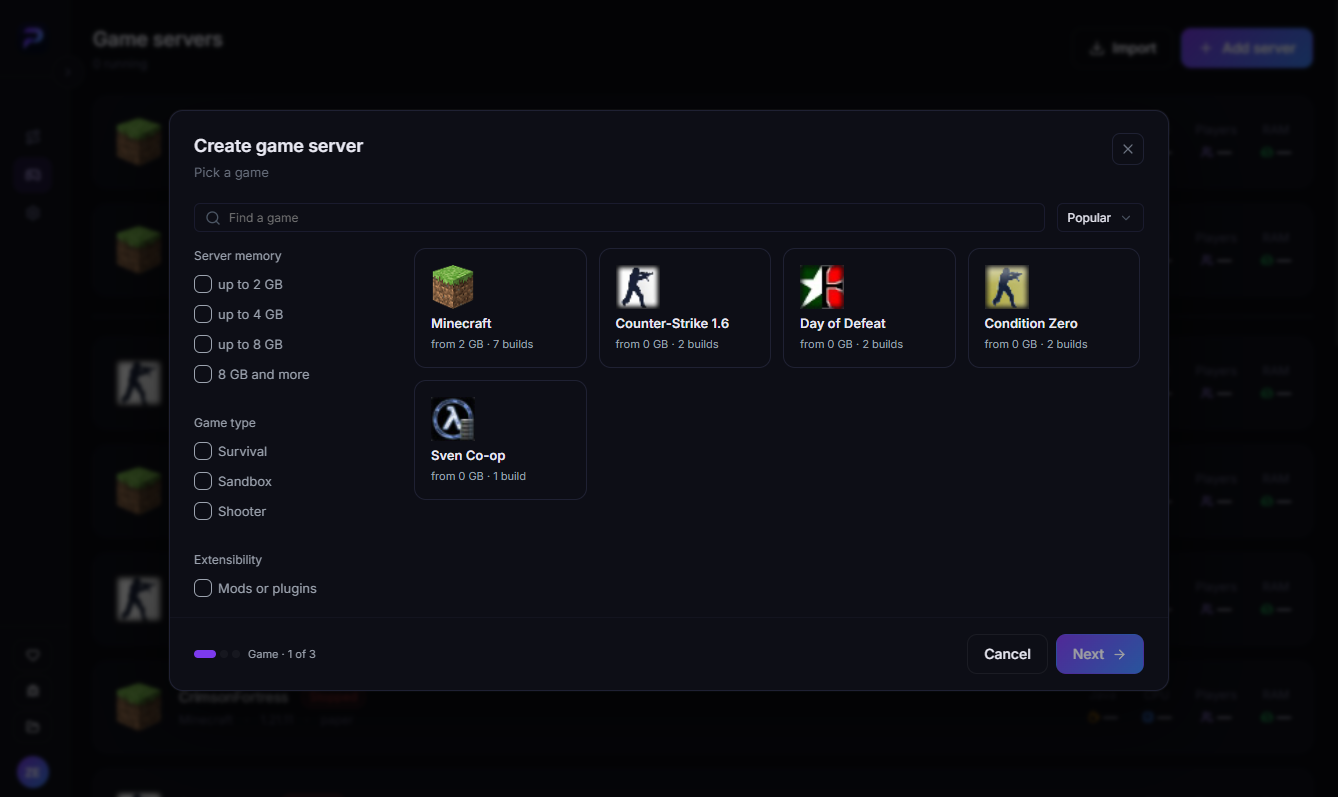
Pick Minecraft from the list and click Next. The search and the filters on the left — Server memory, Game type and Extensibility — help you find a game faster.
Step 2. Build
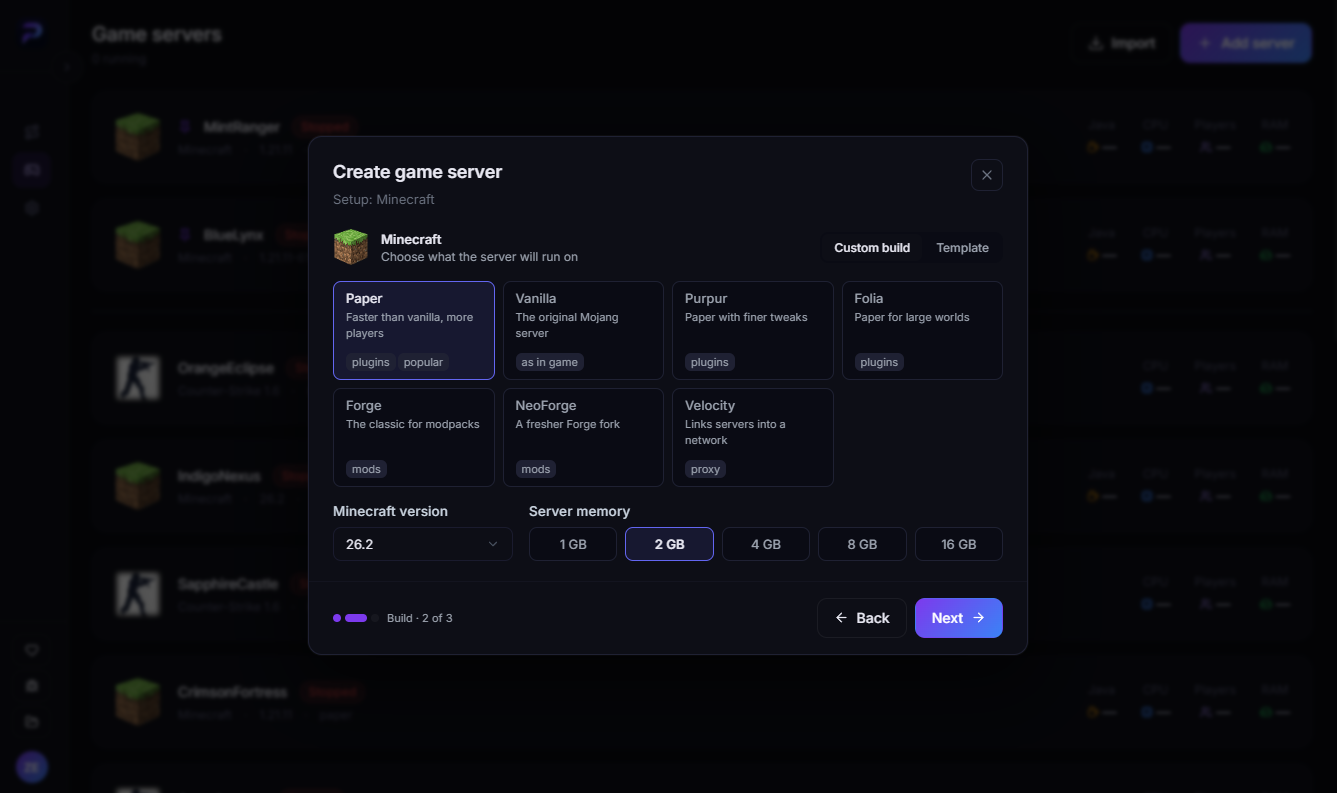
At the top of the step there's a switch between Custom build and Template.
With Custom build you pick the core yourself. Minecraft has seven. Here's how they differ:
| Core | What it's for |
|---|---|
| Paper | Optimized core with plugin support — fits most servers |
| Vanilla | The original Mojang server, no plugins or mods |
| Purpur | A Paper fork with extra gameplay settings; plugins work too |
| Folia | A multithreaded Paper fork for large worlds and player counts on many-core hardware; only plugins built for Folia will load |
| Forge | The classic for modpacks |
| NeoForge | A modern Forge fork for mods on recent versions |
| Velocity | A proxy that links several servers into one network; it doesn't run a world itself |
Below, choose the version in Minecraft version and the memory in Server memory — 1, 2, 4, 8 or 16 GB. Then click Next.
With Template, a ready-made server is installed instead of a core. Only Minecraft has templates.
Step 3. Setup
On the last step:
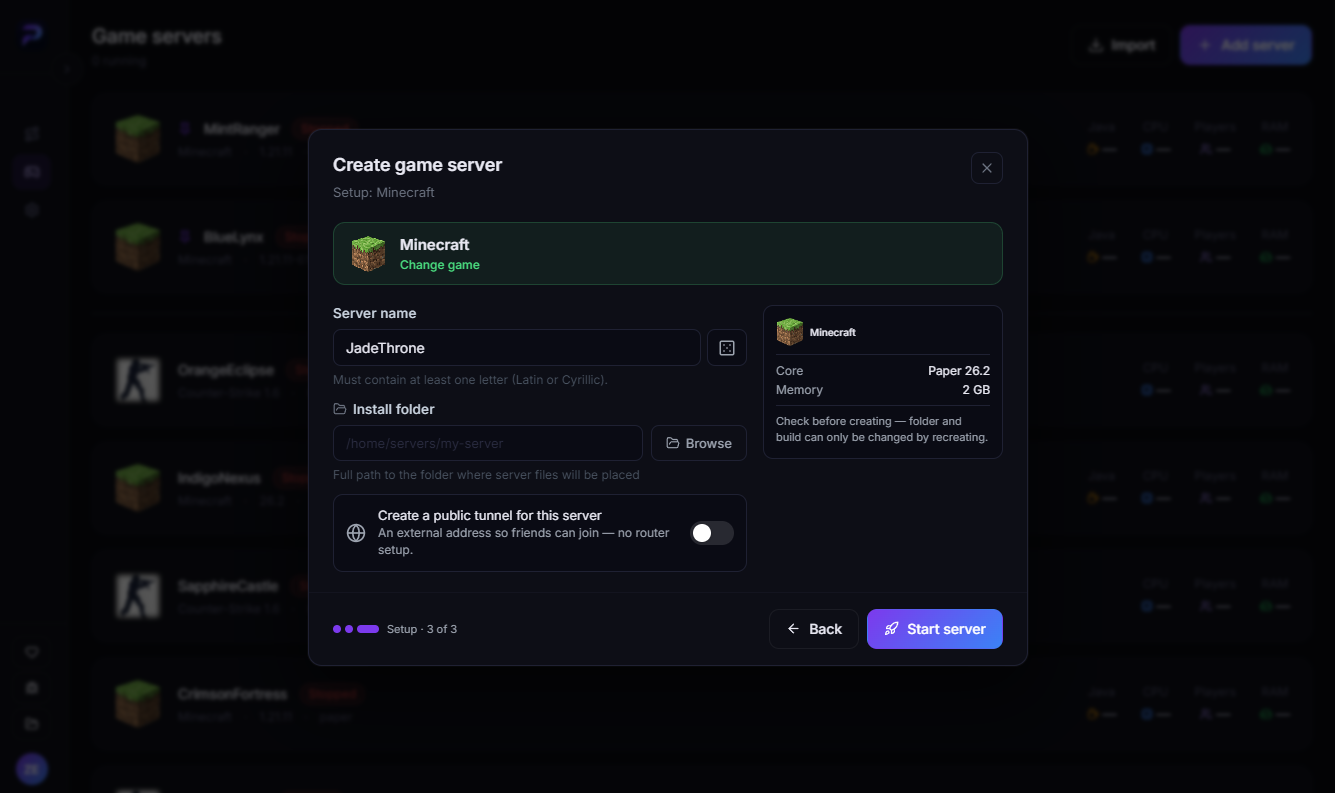
- Server name — type your own or generate one with the dice button. It must contain at least one letter, Latin or Cyrillic.
- Install folder — the full path to the folder where the server files will be placed. You can pick it with Browse.
- Create a public tunnel for this server — this toggle gives the server an external address, so friends can join without router setup. The tunnel requires a ProximaMP account. More on the ProximaTunnel page.
On the right there's a summary: the core with its version and the memory. Check it before creating — the folder and the build can only be changed by recreating the server.
To pick a different game, click Change game on the card at the top. If everything's right, click Start server.
What happens next
After you click Start server, ProximaClient automatically:
- downloads the chosen core (from a built-in mirror);
- installs the right Java version for that Minecraft version;
- prepares the server files.
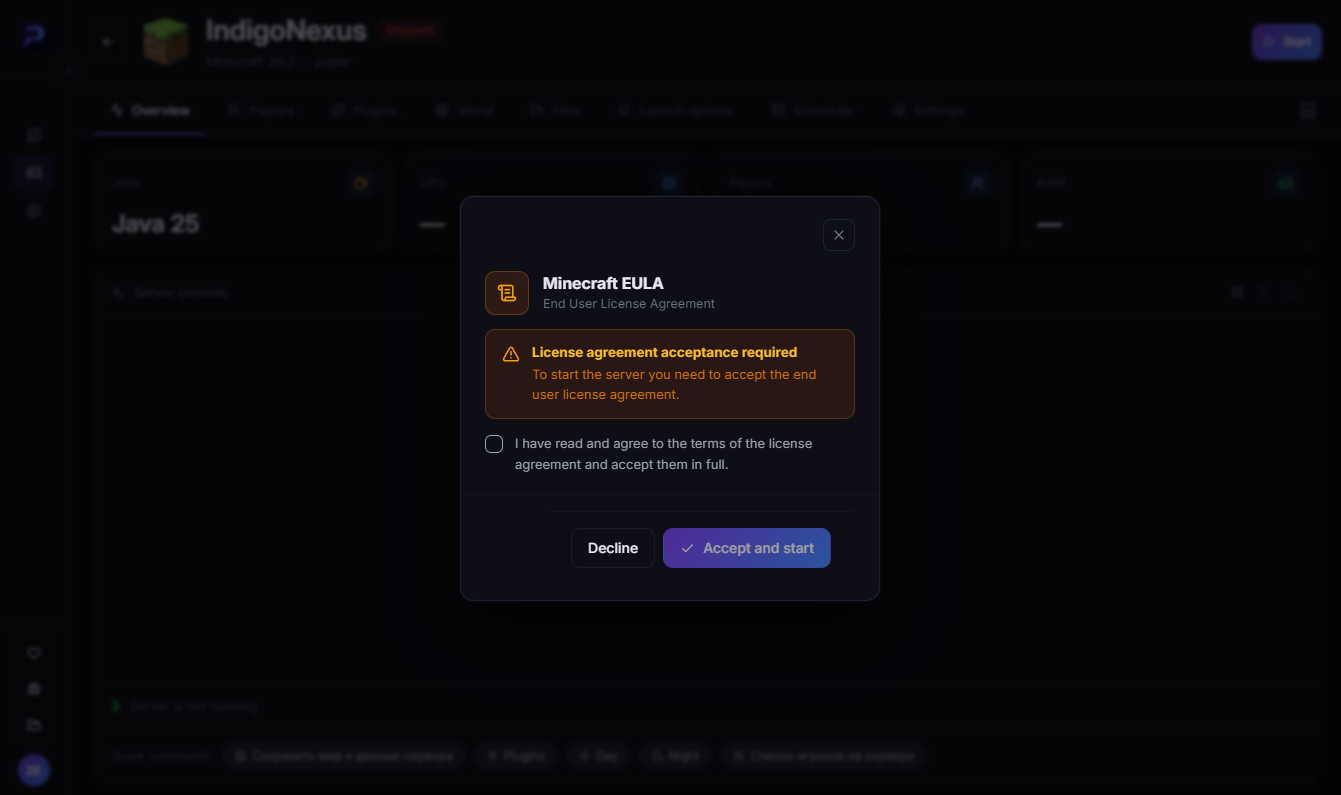
On the first start, ProximaClient shows the Minecraft EULA window — the license agreement the server won't start without. Tick "I have read and agree to the terms of the license agreement and accept them in full" and click Accept and start.
FAQ
Do I need to install Java myself? No. ProximaClient installs the right version for the Minecraft version you picked.
Which core should I pick? Paper for a server with plugins, Forge or NeoForge for mods, Vanilla for the pure game. Purpur is handy if you want extra gameplay settings. Folia is only for very large servers on many-core hardware: regular plugins won't load on it, you need Folia-compatible versions. You only need Velocity to link several servers into a network.
What are templates? Ready-made servers installed instead of a custom build. They're on the Build step under Template, and only Minecraft has them.
How much memory should I allocate? For 2–5 players, 2 GB is enough; for modpacks, 4 GB and up. Don't give the server all your PC's memory — leave some for the system.
Can I change the folder or the build later? Only by recreating the server. That's why it's worth checking the summary on the last step before starting.
What does the public tunnel do? The server gets an external address friends can join without a public IP or router setup. The tunnel requires a ProximaMP account. More on the ProximaTunnel page.
Can I set up a server manually, without the app? Yes — see the How to create a Minecraft server on your PC guide.
Launch your first server
Download ProximaClient for Windows → — and create your own server in a couple of minutes, with no terminal and no configs.