
proximaclient.json — plugin & mod API for ProximaClient
Also available in: Русский
The proximaclient.json file lets a plugin or mod author extend the ProximaClient app for their project without involving our team:
settings— gives the plugin its own settings screen (a gear icon on the plugin card → a modal with fields). The user edits the config through the UI, without opening.yml/.tomlby hand.content— adds your commands, items, effects, etc. to the server console autocomplete (the user sees suggestions as they type a command).
Both blocks are optional — you can ship settings only, content only, or both. The format is versioned via schemaVersion (current version — 1). This is a developer-facing document; the examples use Minecraft.
If you're not sure how users install plugins yet, see How to install plugins on a Minecraft server.
Where the file lives
The app looks for the manifest in two places, in this priority order:
- In the root of your
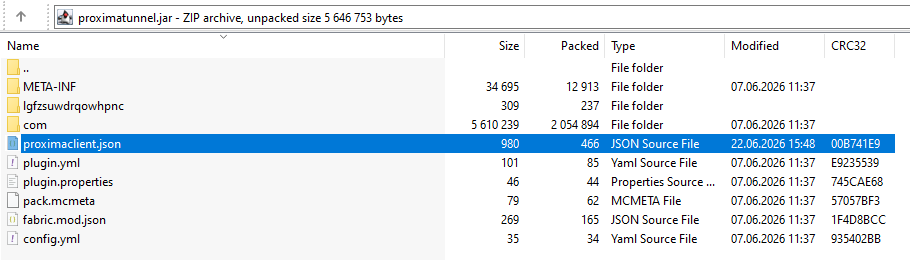
.jar— aproximaclient.jsonfile next toplugin.yml/paper-plugin.yml/mods.toml/fabric.mod.json. - On the ProximaMP CDN (fallback, if the jar has no file) — by plugin/mod name.
MyPlugin.jar
├── proximaclient.json   ← here, in the archive root
├── plugin.yml
└── ...classes...
CDN fallback (on the ProximaMP side)
If the jar has no file, the app tries to fetch the manifest from our CDN by plugin name. The ProximaMP team places schemas there — for example, ready-made settings for popular plugins that don't ship their own proximaclient.json. Plugin authors don't have direct CDN access: your main path is the file in the jar.
The app-side cache is 5 minutes. Need a CDN fallback for your plugin (e.g. you can't modify the jar)? Contact the ProximaMP team — we'll add it on our side.
Priority: if the file exists both in the jar and on the CDN, the version from the jar wins. The CDN is used only when the jar has no file.
Top level of the file
{
  "schemaVersion": 1,        // file format version (number, defaults to 1)
  "settings": { ... },       // optional — settings screen
  "content":  { ... }        // optional — data for console autocomplete
}
| Field | Type | Req. | Description |
|---|---|---|---|
schemaVersion | number (integer > 0) | no | Format version. Defaults to 1 if omitted. |
settings | object | no | Settings screen schema. |
content | object | no | Game-data delta for the console. |
Unknown keys are forbidden. Any unknown key at any level → the whole file is considered invalid and ignored (strict validation).
The settings block — settings screen
Adds a gear icon and a settings modal to the plugin. The user changes values — the app writes them to the specified config file.
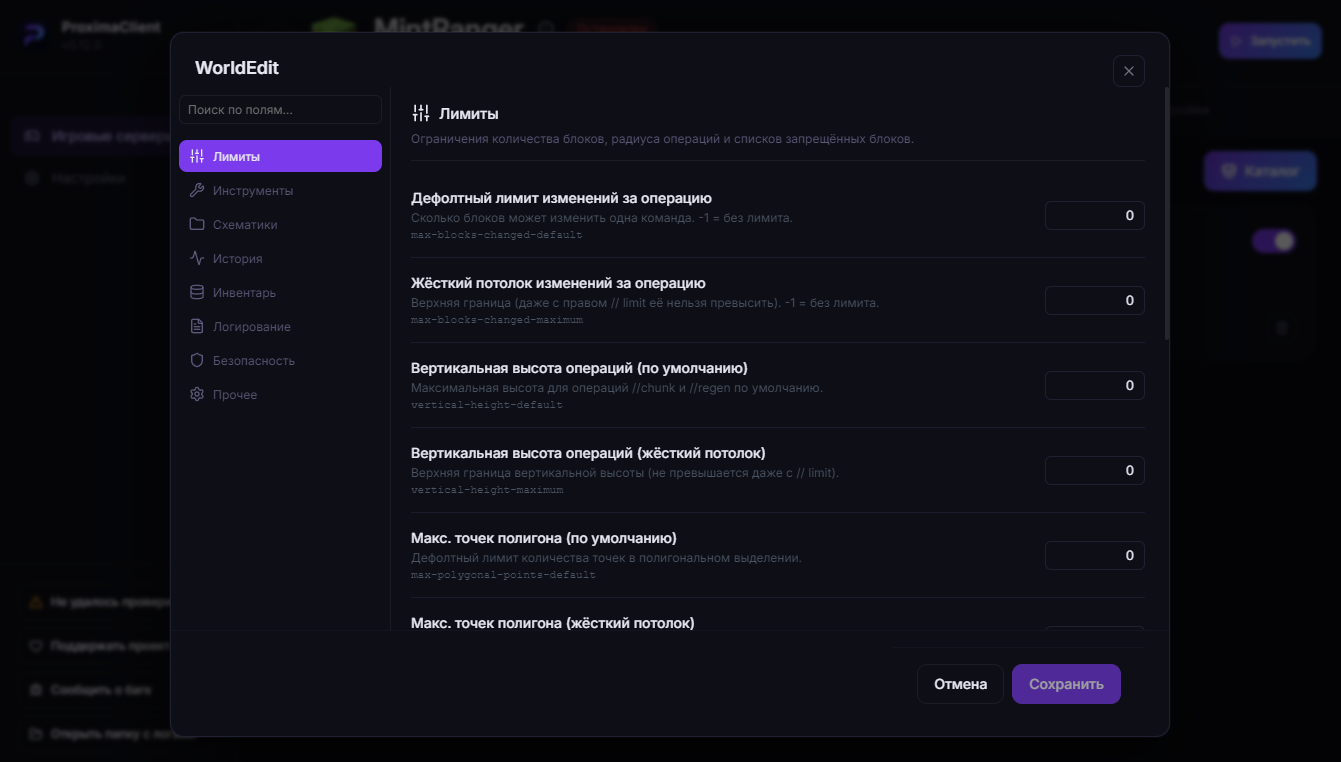
Top-level settings fields
| Field | Type | Req. | Description |
|---|---|---|---|
categoryId | string | yes | Plugin category (see list below). A value outside the list → the settings block is dropped. |
configPath | string | yes | Path to the editable config relative to the server folder (e.g. plugins/MyPlugin/config.yml). No line breaks; ≤ 255 chars. |
description | {ru, en} | yes | Short description for the modal header. |
fields | array | yes | Form fields. Up to 300. |
groups | array | no | Grouping fields into tabs. Up to 50. |
Allowed categoryId (exactly these 6 values):
categoryId | Purpose |
|---|---|
administration | Administration, management |
security | Security, access, passwords |
performance | Performance, optimization |
gameplay | Gameplay, mechanics |
communication | Chat, messages, notifications |
other | Other |
Form field (fields[])
{
  "key": "max-homes",          // required — field identifier
  "path": "homes.max",         // opt. — path in the config (defaults to key)
  "type": "number",            // required — control type
  "required": false,           // opt. — whether the field is required
  "label": { "ru": "Макс. домов", "en": "Max homes" },        // required
  "description": { "ru": "Лимит домов на игрока", "en": "Homes per player" }  // opt.
}
| Attribute | Type | Req. | Description |
|---|---|---|---|
key | string (1–64) | yes | Unique field identifier within the schema. |
path | string (1–128) | no | Path to the value in the config (dot notation, e.g. homes.max). Defaults to key. |
type | string | yes | Field type — one of 6 (see below). |
required | boolean | no | Marks the field required. Defaults to false. |
label | {ru, en} | yes | Field label in the UI. |
description | {ru, en} | no | Helper text under the field. |
options | array | for enum | Choice options. |
withGenerator | boolean | for password | "Generate password" button. |
Field types (type)
type | UI control | Extra attributes |
|---|---|---|
string | Text field | — |
password | Password field (hidden input) | withGenerator: true → generate button |
number | Number field | — |
boolean | Toggle | — |
enum | Dropdown | options — required, ≥ 1 item |
string-array | String list editor | — |
enum option (options[]):
{
  "value": "strict",                                  // what gets saved to the config (1–128 chars)
  "label": { "ru": "Строгий", "en": "Strict" }        // what to show in the list
}
values within one field must be unique.
Groups / tabs (groups[])
Optional. Splits fields into tabs inside the modal. Fields not assigned to any group go to the "General" tab. If groups is omitted, fields render as a flat list.
{
  "id": "general",                                    // required, unique (1–64)
  "icon": "settings",                                 // opt. — icon name
  "label": { "ru": "Общее", "en": "General" },        // required
  "description": { "ru": "Базовые опции", "en": "Basics" },  // opt.
  "fieldKeys": ["max-homes", "mode"]                  // required — keys of this tab's fields
}
Each fieldKeys[i] must reference an existing key from fields. Up to 300 keys per group.
The content block — console data
Adds your plugin's commands and game objects to the server console autocomplete. It's a flat delta on top of the built-in game data: you can add new entries and remove existing ones.
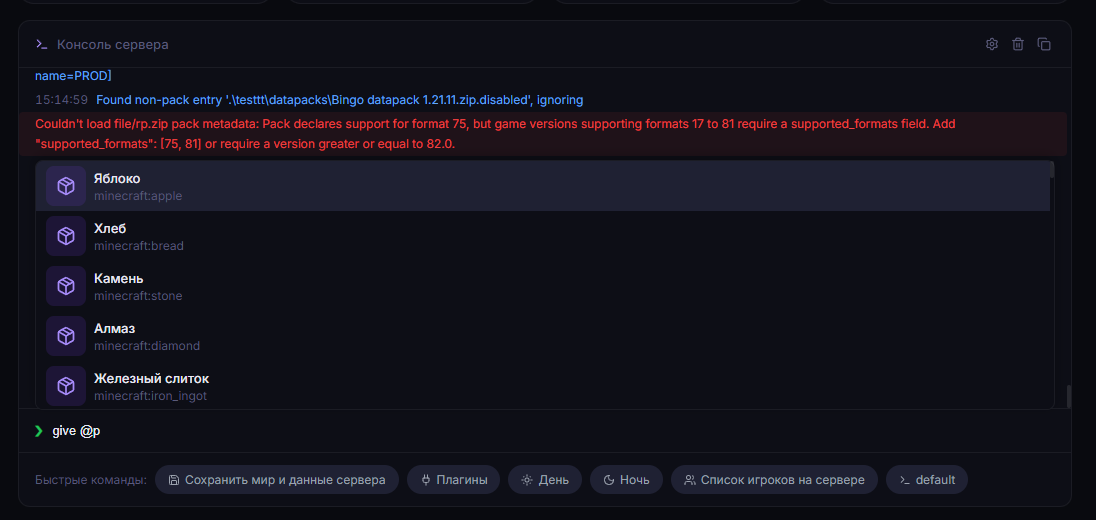
Contents of the content block
| Field | Type | Description |
|---|---|---|
addedCommands | array of CommandTemplate | New commands. Up to 200. |
removedCommands | array of string | Command names to remove from suggestions. Up to 200. |
addedItems / removedItems | array | Item registry. |
addedEffects / removedEffects | array | Effect registry. |
addedEnchantments / removedEnchantments | array | Enchantment registry. |
addedMobs / removedMobs | array | Mob/entity registry. |
addedBiomes / removedBiomes | array | Biome registry. |
addedAttributes / removedAttributes | array | Attribute registry. |
addedSounds / removedSounds | array | Sound registry. |
addedParticles / removedParticles | array | Particle registry. |
addedStructures / removedStructures | array | Structure registry. |
addedDimensions / removedDimensions | array | Dimension registry. |
added* take an array of GameItem objects, removed* — an array of identifier strings.
Command template (CommandTemplate)
{
  "name": "sethome",                                   // required — command name (no slash)
  "description": { "ru": "Установить дом", "en": "Set home" },  // opt.
  "usage": { "ru": "<имя>", "en": "<name>" },          // opt. — free-tail hint
  "slots": []                                          // required — positional arguments
}
| Attribute | Type | Req. | Description |
|---|---|---|---|
name | string (1–64) | yes | Command name without a slash. Allowed: A–Z a–z 0–9 _ : -. Subcommands are modeled via enum + followedBy, not a space in the name. |
description | {ru, en} | no | Command description in the suggestion. |
usage | {ru, en} | no | Hint for the "free tail" (coordinates, JSON, text). Shown when slots run out but the command still expects input. |
slots | array of CommandSlot | yes | Positional arguments in order. Up to 64. An empty array = a command with no arguments. |
Slots (slots[]) — supported kinds
Each slot describes one positional argument. There are 12 kinds (kind):
kind | What it suggests | Where the values come from |
|---|---|---|
enum | A fixed list of options | Inline, from the slot itself (values) |
player | Player name | Online players (+ selectors @a @e @p @s @r @n) |
items | Item | addedItems registry (+ built-ins) |
effect | Effect | addedEffects registry |
enchantment | Enchantment | addedEnchantments registry |
mob | Mob / entity | addedMobs registry |
biome | Biome | addedBiomes registry |
attribute | Attribute | addedAttributes registry |
sound | Sound | addedSounds registry |
particle | Particle | addedParticles registry |
structure | Structure | addedStructures registry |
dimension | Dimension | addedDimensions registry |
Simple slots are written as { "kind": "player" }, { "kind": "items" }, etc. The enum slot is special (see below).
The enum slot, EnumValue and subcommands (followedBy)
{
  "kind": "enum",
  "values": [
    { "value": "add",    "followedBy": [ { "kind": "player" } ] },
    { "value": "remove", "followedBy": [ { "kind": "player" } ] },
    { "value": "list" }
  ]
}
| Attribute | Type | Req. | Description |
|---|---|---|---|
value | string (1–64) | yes | The value sent to the server as-is. |
label | {ru, en} | no | Display name of the option. |
description | {ru, en} | no | Option explanation. |
followedBy | array of CommandSlot | no | Slots added after this value if it's chosen. This is how subcommands are made. Recursive. Up to 64. |
Subcommands via followedBy: the whitelist command is a template with name: "whitelist" and a single enum slot [add, remove, on, off, list], where add/remove have followedBy: [{ "kind": "player" }], and on/off/list don't. Up to 256 values in one enum.
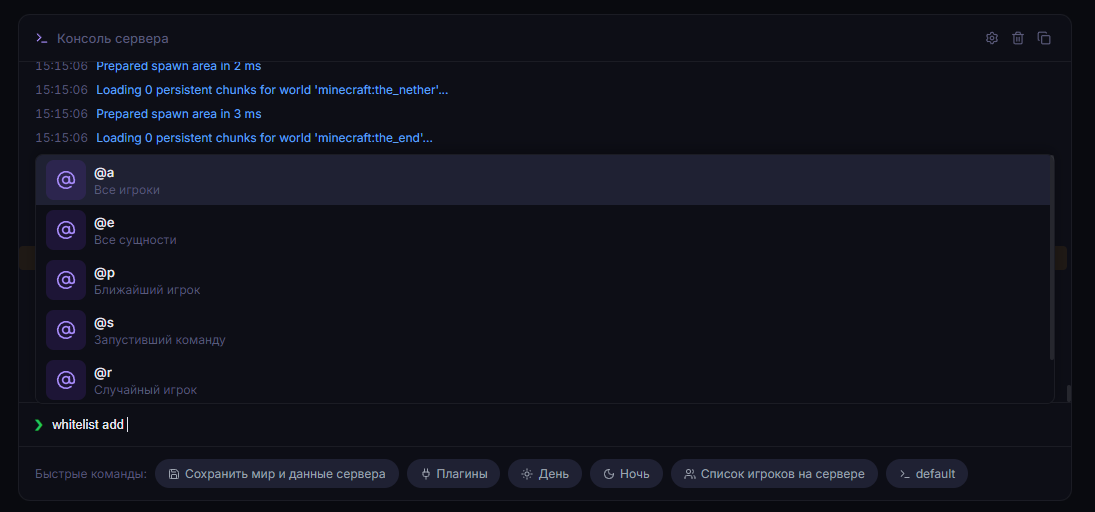
Game object (GameItem)
An element of any added* registry:
{
  "id": "myplugin:magic_wand",                          // required
  "name": { "ru": "Волшебная палочка", "en": "Magic Wand" }  // required
}
| Attribute | Type | Req. | Description |
|---|---|---|---|
id | string (1–128) | yes | Identifier sent to the server as-is. Format: namespace:path or just path. |
name | {ru, en} | yes | Human-readable name in the suggestion. |
The registry expands dynamically: add an item via addedItems and it's immediately available in items slots.
Limits and validation
The file is untrusted input, so it's validated strictly. On any validation error, the file (or the corresponding block) is fully ignored — the app keeps working without your schema.
What gets it rejected:
- Extra/unknown keys at any level.
- Exceeding limits: ≤ 200 commands, ≤ 200
removedCommands, ≤ 2000 entries per registry, ≤ 256 values in anenum, ≤ 64 slots, ≤ 300 fields, ≤ 50 groups. Localized strings{ru, en}— ≤ 200 chars. - Invalid command name / id (command names — only
A–Z a–z 0–9 _ : -). categoryIdoutside the list — thesettingsblock is dropped.- File size > 512 KB — not read from the jar.
- Broken JSON.
Tip: if the schema "isn't picked up", check the file with a strict JSON validator, verify
categoryIdagainst the list, and make sure there are no extra fields.
Full proximaclient.json example
{
  "schemaVersion": 1,
  "settings": {
    "categoryId": "gameplay",
    "configPath": "plugins/Homes/config.yml",
    "description": { "ru": "Настройки системы домов", "en": "Homes settings" },
    "fields": [
      { "key": "max-homes", "path": "homes.max", "type": "number",
        "label": { "ru": "Макс. домов", "en": "Max homes" } },
      { "key": "cooldown", "path": "homes.cooldown-seconds", "type": "number",
        "label": { "ru": "Кулдаун (сек)", "en": "Cooldown (s)" } },
      { "key": "cross-world", "type": "boolean",
        "label": { "ru": "Телепорт между мирами", "en": "Cross-world teleport" } }
    ]
  },
  "content": {
    "addedCommands": [
      { "name": "home", "slots": [],
        "description": { "ru": "Телепорт домой", "en": "Teleport home" } },
      { "name": "sethome", "slots": [],
        "usage": { "ru": "<имя дома>", "en": "<home name>" } },
      { "name": "delhome", "slots": [],
        "usage": { "ru": "<имя дома>", "en": "<home name>" } }
    ]
  }
}
Integration questions
The format version is schemaVersion: 1. For integration questions, reach the ProximaMP team via Telegram. ProximaClient itself is on the /client page.