
Failed to bind to port in Minecraft: how to fix
Also available in: Русский
Your Minecraft server won't start and the console shows FAILED TO BIND TO PORT? It means the port the server is trying to use is already taken. Let's go through why and how to fix it.
In the logs the error looks like this:
[Server thread/WARN]: **** FAILED TO BIND TO PORT!
The exception was: java.net.BindException: Address already in use: bind
Perhaps a server is already running on that port?
What it means
By default a Minecraft server listens on port 25565. The Failed to bind to port error (a.k.a. Address already in use) means that port is already taken by another program — most often another or a hung Minecraft server.
Common causes
- A second instance of the server is already running.
- A previous server didn't shut down fully — a
javaprocess is still in the background. - Two servers are configured on the same port.
- The port is taken by another program.
How to fix it manually
1. Close the extra or hung server
Make sure you don't have a second server running. If the previous one "froze", end the java (or javaw) process in Task Manager → "Details" tab.
2. Find what's holding the port
In the command prompt (cmd):
netstat -ano | findstr :25565
The last number in the line is the process PID. Find it by PID in Task Manager ("Details" tab) and end it.
3. Change the server port
If another program needs the port, change the server's port in server.properties:
server-port=25566
Restart the server.
If friends connect directly by IP, they'll now need to specify the new port. But with ProximaTunnel the
name.proximamp.comaddress doesn't depend on the local port — friends connect the same way as before.
4. Restart the PC
If you can't find the process and the port is still busy, a reboot frees it. This is a last resort.
With ProximaClient — one click
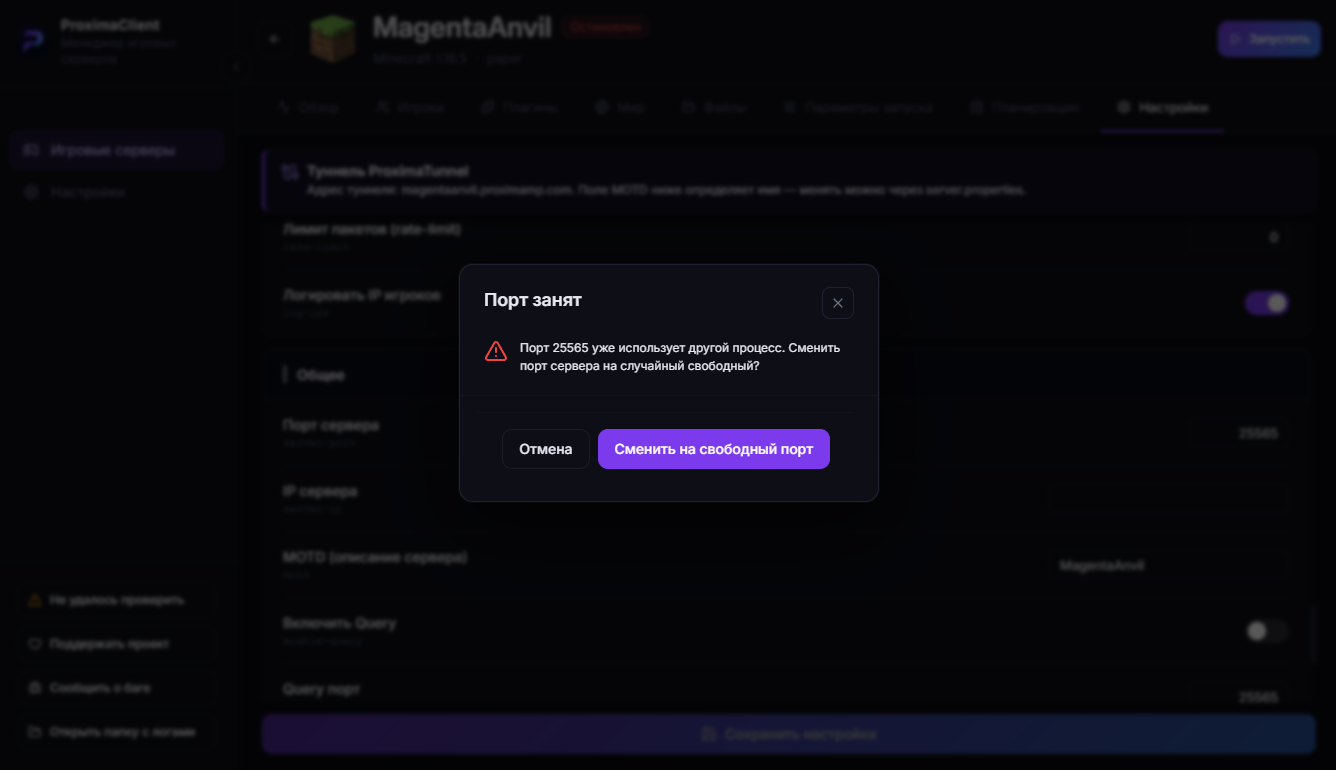
If you create your server in ProximaClient, you don't have to deal with this: when the port is busy, the app tells you and offers a button to switch to a free port. You click it — and the server starts.
FAQ
What is port 25565? It's the default Minecraft server port: the server listens on it, and players connect through it.
I changed the port — how do friends join? For a direct connection — specify the address with the new port (ip:port). Through ProximaTunnel — by the same address, the local port doesn't matter.
Is Address already in use the same error? Yes, it's the same problem: the port is taken.
Easier — with ProximaClient
ProximaClient catches the busy port and changes it with a button, no cmd and no netstat. Download for Windows →